
Internal Linking Architecture for Crawl Efficiency and Authority Flow
Corey Batt
Most internal linking advice stops at counting. How many links per page, how many words between them, whether four is better than six. That advice isn’t wrong, it’s just aimed at a single blog post. And if you’re running a site with 10,000 pages, or 100,000, or a catalog that spins up filtered URLs faster than you can audit them, counting links on one page solves nothing.
The real work at that scale is architecture. Which pages can Google reach, how fast it reaches them, and where your authority pools versus where it drains. Get the architecture right and the link counts mostly take care of themselves. Get it wrong and you’ll have thousands of pages sitting in Search Console under “Discovered, currently not indexed,” quietly earning nothing.
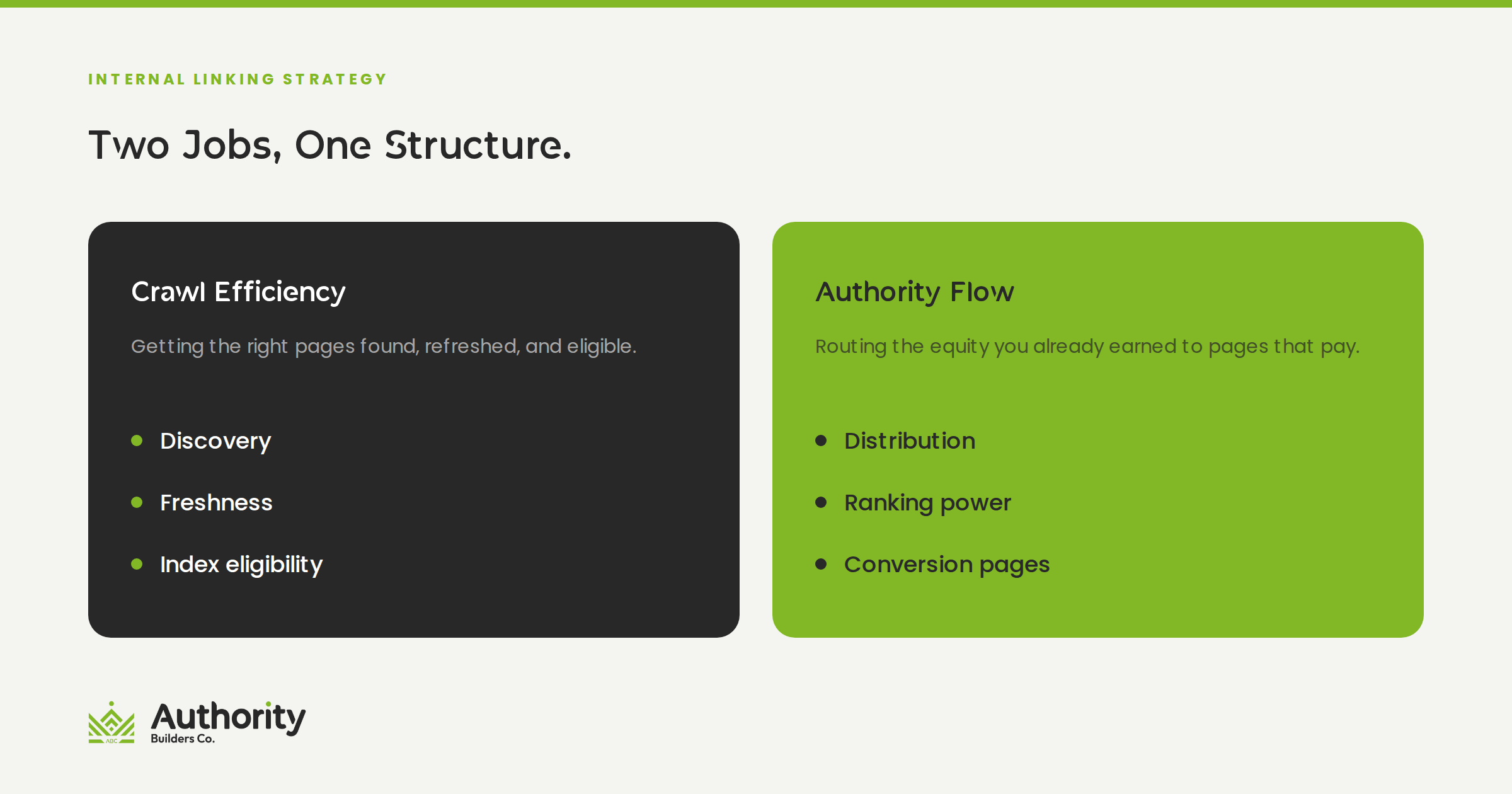
Here’s the thing: an internal linking strategy is really two strategies wearing one coat. One governs crawl efficiency, which is about discovery and freshness. The other governs authority flow, which is about which pages get the ranking power you’ve paid to acquire. They overlap, but they aren’t the same job, and the tactics that help one can hurt the other.
Let’s break down how to design both.
Crawl Efficiency and Authority Flow Are Two Different Problems
Before we touch tactics, it’s worth being precise about what each half of the job does, because conflating them is how sites end up with elaborate linking schemes that accomplish nothing.
Crawl efficiency is about access. Can Google find the page, and how often does it come back? This is a plumbing question. It’s answered by discovery paths, server response, URL inventory, and how much of your crawl allocation gets spent on pages that were never going to rank.
Authority flow is about distribution. You’ve earned links to some pages on your site. Internal links are the mechanism that spreads that value to the pages you want ranking. This is an editorial and structural question, and it’s the half most sites underinvest in.
The important distinction: crawling is not a ranking factor. Google is direct about this in its crawling documentation, noting in its list of myths and facts about crawling that improving your crawl rate won’t by itself move you up the results, since crawling is a prerequisite for appearing in search rather than a signal used to rank. So if you’re pitching a crawl budget project internally on the promise of higher rankings, you’re setting yourself up. Crawl work gets pages eligible. Authority work gets them competitive. You need both, and you should describe them precisely.
How Google Decides What to Crawl
Google moved its crawl budget guidance out of the main Search Central docs and into a dedicated crawling infrastructure section, and the current guide on how to optimize your crawl budget is worth reading in full if you manage anything large. A few points from it reshape how you should think about architecture.
Crawl budget is the product of two things. The first is a crawl capacity limit, sometimes called hostload, which is how much simultaneous connection time Google is willing to hold open against your server. Google starts every site at the same conservative default and adjusts upward if the site stays healthy. Slow response times, 5xx errors, and rate-limiting responses push it back down. The second is crawl demand, which reflects your site’s size, update frequency, page quality, and relevance compared to everyone else.
A “site” means a hostname, not a domain. This one has direct architectural consequences. Google treats www.example.com and shop.example.com as separate sites with separate crawl budgets. If you’re weighing a subdomain against a subfolder for a large content section, you’re not just weighing authority consolidation. You’re deciding whether that section gets its own crawl allocation or shares yours.
Crawl capacity is shared across every Google crawler, but demand isn’t. Google states plainly that high demand from one crawler can reduce the capacity available to others. If AdsBot or a shopping crawler is working hard on your site, Googlebot has less room. This is the part most crawl budget content published before this year simply doesn’t cover.
And who is this for? Google gives rough thresholds: sites past a million unique pages with content changing about weekly, sites past 10,000 unique pages changing daily, and sites with a large share of URLs classified as “Discovered, currently not indexed.” If you run 400 pages and publish twice a month, crawl budget is not your bottleneck and we’d rather you spend the time on content and links.
One more line from that guide deserves emphasis, because it’s the one that makes internal linking the lever rather than a nice-to-have. Of the factors driving crawl demand, Google identifies perceived inventory as the one you can positively control the most. Perceived inventory is just the set of URLs Google believes exists on your site. Your internal linking and URL structure are how that set gets defined.
Click Depth: What It Does and What It Doesn’t
“Keep everything within three clicks of the homepage” is probably the most repeated rule in site architecture. It’s directionally useful and frequently oversold.
Google’s own answer, given in its crawling myths document, is “partly true.” Pages linked directly from the homepage may be seen as more important and therefore crawled more often, since the homepage is usually a site’s most important page. But Google is explicit that this doesn’t mean those pages will rank higher than pages further down.
So click depth is a crawl frequency lever, not a ranking lever. That’s still worth a lot on a large site, because a page crawled monthly can’t compete on freshness with a page crawled daily. But it reframes the work:
- Don’t flatten everything. Cramming 300 links into a mega-menu to get every page to depth two produces a navigation that dilutes rather than directs.
- Do flatten deliberately. Identify the pages that carry revenue or strategic value and shorten their paths specifically.
- Measure depth from more than the homepage. On a large site, the practical question is depth from any high-authority hub, not just from the root.
- Treat depth as a symptom. A page sitting at depth seven usually isn’t a depth problem. It’s a hub problem, meaning nothing in the middle of your site is doing its job.
Designing Crawl Paths: Hubs, Silos, and Clusters
The classic silo model says a topic’s pages should link tightly to each other and to their hub, and should avoid linking across into other silos. Strict siloing does concentrate relevance and it does make crawl paths predictable. It also produces sites where closely related pages can’t reference each other, which is a bad outcome for readers and an unnecessary one.
We’d suggest a softer version. Build silos for structure, then let content cross-link on merit.
Navigation and breadcrumbs enforce the silo. These are your deterministic crawl paths. Every product sits under exactly one category. Every article sits under exactly one topic hub. Breadcrumbs make the hierarchy machine-readable and give crawlers a consistent upward path from any depth.
Body content ignores the silo when it should. If an article about shipping costs really helps someone reading about returns policy, link it. Google’s documentation on link best practices frames internal linking around exactly this: think about which resources on your site would help a reader understand a given page, and link to those in context.
Hubs need to be real pages, not link dumps. A hub page that exists only to hold 80 links will not accumulate the authority you need it to pass along. Give it substance, then let it distribute.
On the question everyone asks, Google’s position is that there’s no magical ideal number of links a page should have, followed by the useful qualifier that if you think it’s too many, it probably is. That supersedes the older 100-link guidance you’ll still find quoted around the web, including in our own earlier post on how many internal links per page to include. Treat that piece as the on-page primer and this one as the site-level companion.
Where Large Sites Waste Crawl Budget
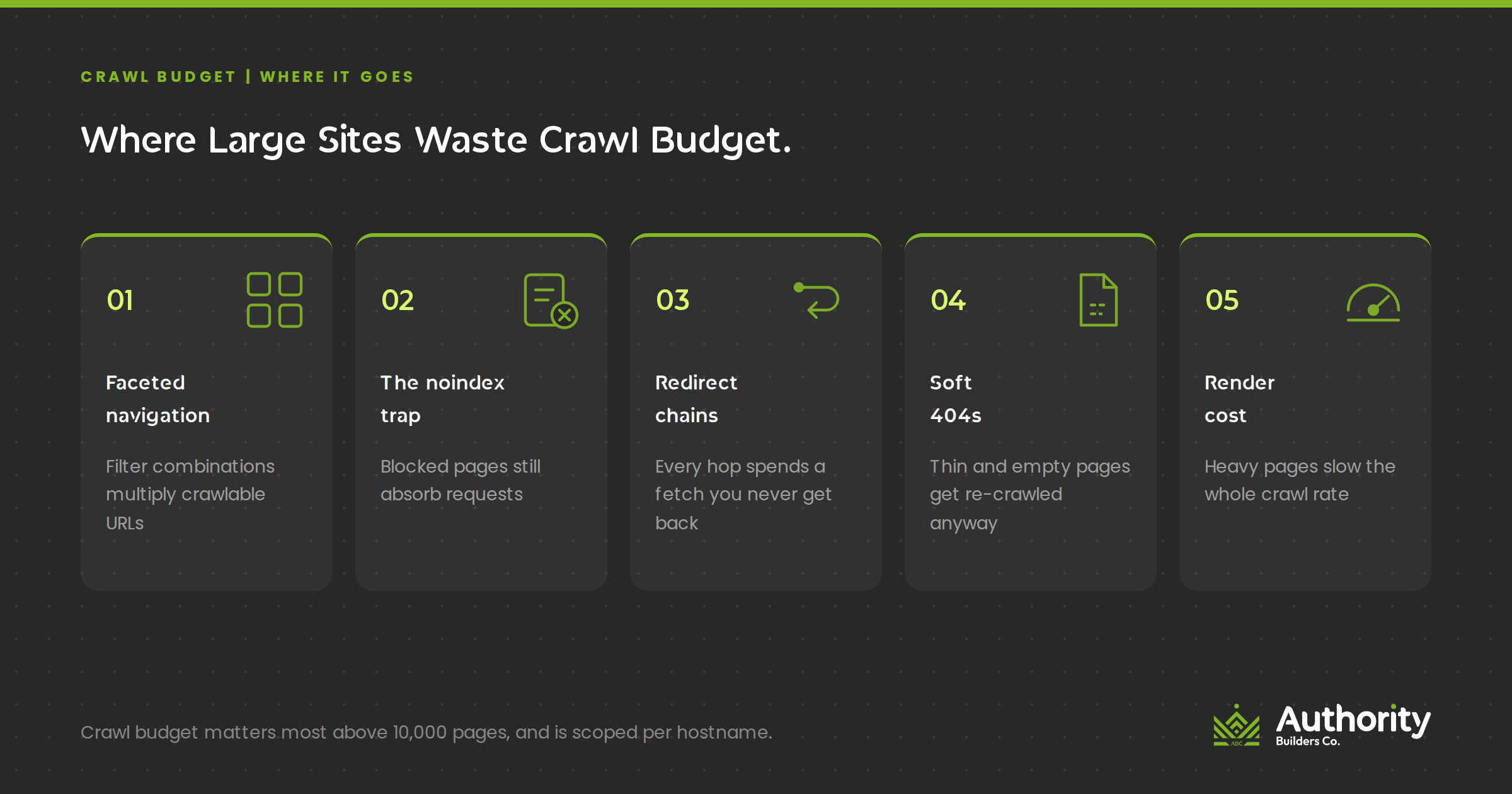
Crawl waste is rarely one dramatic problem. It’s usually five ordinary ones compounding.
Faceted navigation
This is the big one for ecommerce and any large catalog. Filter combinations generate what Google’s guidance on managing crawling of faceted navigation URLs calls infinite URL spaces. The damage happens twice: crawlers can’t tell a useless filter URL is useless without crawling it first, so they overcrawl, and every request spent there is a request not spent discovering something new.
Google’s recommended fixes, in rough order of effectiveness:
- Block them in robots.txt if you don’t need filtered views indexed. Allow the individual item pages and one unfiltered listing page, and disallow the parameter patterns.
- Move filters to URL fragments. Google generally doesn’t support fragments in crawling and indexing, so a fragment-based filter has no crawl impact at all.
- Use rel=”canonical” or rel=”nofollow” if the first two aren’t options. Google notes both are less effective long-term, and nofollow only works if every anchor pointing at that URL carries the attribute, which is hard to guarantee across a large template.
If you do need facets crawlable, Google asks for the standard & parameter separator rather than commas or semicolons, a fixed logical filter order with no duplicates when filters live in the URL path, and a real 404 when a filter combination returns nothing rather than a redirect to a generic error page.
The noindex trap
This one catches experienced teams. Google explicitly advises against using noindex to manage crawl budget, because Google still has to request the page to discover the noindex directive. You spend the crawl and get nothing. The nuance worth keeping: noindex is still the correct tool for keeping pages out of the index, and removing URLs from the index can indirectly free capacity over time. Just don’t reach for it as a crawl budget instrument.
Same category of mistake: don’t use robots.txt to temporarily reallocate budget. Google won’t shift the freed capacity elsewhere unless you were already hitting your crawl capacity limit.
Redirect chains and internal links pointing at 301s
Google names long redirect chains as having a negative effect on crawling. Beyond the crawl cost, every internal link pointing at a redirect rather than the final URL is a small, avoidable tax on your own architecture. After a URL migration this is usually the single largest cleanup item, and it’s mechanical work that a crawl export will hand you directly.
Soft 404s and stale sitemaps
Soft 404s keep getting crawled and keep costing you, so check the Page Indexing report and fix them. Return a proper 404 or 410 for permanently removed pages, since a 404 is a strong signal not to come back while a robots-blocked URL lingers in the crawl queue much longer. Worth knowing: hard 4xx responses other than 429 don’t waste crawl budget, because Google got a status code and no content to process.
Keep sitemaps current and include the lastmod tag. And skip the compression theory. Google is direct that zipped sitemaps still have to be fetched, so you save essentially nothing.
Render cost
Rendering counts against your budget just like fetching does. Every JavaScript and CSS resource needed to render a page consumes crawl allocation on the hostname serving it. Fewer resources per page means less budget burned per crawl.
Where Link Equity Leaks Inside Your Own Site
Now the other half of the job. You’ve built links to your site. Where does that value end up?
On most large sites, the answer is: mostly in the wrong places. A few predictable patterns cause it.
Boilerplate dominance. Every page links to your privacy policy, your careers page, and your login. Those pages accumulate enormous internal link counts and pass value onward to nothing. Sitewide footer links are the least discriminating internal links you have, so keep the footer lean and put the discrimination in the body content.
Orphans and near-orphans. A true orphan has no internal links at all. The bigger problem on large sites is the near-orphan: a page with one or two links, both from low-value templates. Google’s link documentation sets a clean minimum here, stating that every page you care about should have a link from at least one other page on your site. Treat that as the floor, not the target.
Authority pages that don’t pass anything. This is the highest-leverage fix available on most sites. You almost certainly have informational pages that earned strong external links and link out to nothing commercially relevant. Find your most-linked pages, then check what they point at. If the answer is your homepage and a category page, you’re leaving value stranded. Our own analysis of which pages you should build links to covers the tested version of this pattern, including where it stops working.
Anchor text that says nothing. Google asks for anchor text that’s descriptive, reasonably concise, and relevant to both the page it’s on and the page it points to, with a good test being whether the anchor still makes sense read on its own. It also warns against chaining links next to each other, since readers can’t distinguish them and each link loses its surrounding context.
The overcorrection is real too. Cramming target keywords into every internal anchor is keyword stuffing, and Google says so directly. Vary your anchors, use natural phrasing near the keyword rather than the exact keyword every time, and let a reasonable share of your internal anchors be plain descriptive language.
Running an Internal Link Audit That Produces a Work Queue
An audit that ends in a 200-page PDF nobody actions is worse than no audit. Here’s the sequence we’d run, structured so each step outputs a list someone can work through.
- Crawl the site and export inlinks per URL. Screaming Frog, Sitebulb, or Ahrefs Site Audit all do this. You want URL, unique inlinks, click depth from home, status code, and indexability.
- Join it to traffic and revenue data. This is the step most teams skip and it’s what turns a technical list into a priority list. Pull Search Console clicks and impressions, plus whatever conversion data you have.
- Find high-value, low-inlink pages. Sort for pages with meaningful impressions or revenue and few internal links. This is your fix-first queue and it’s usually short enough to clear in a couple of weeks.
- Find high-authority, low-outflow pages. Cross-reference referring domains per page against what those pages link to internally. Add contextual links from the strongest ones to the pages in step three.
- Fix links pointing at redirects and errors. Mechanical, unglamorous, and consistently one of the larger wins on any site that’s been through a migration.
- Pull the Search Console crawl stats and Page Indexing reports. Look at what Googlebot is spending requests on and how many URLs sit in “Discovered, currently not indexed.” That number is your crawl efficiency scorecard.
- Analyze server logs if the site is large enough to justify it. Logs are the only place you see real crawler behavior rather than a simulation of it. Past roughly 100,000 URLs, this stops being optional.
Set a cadence and keep it. Architecture drifts. New templates ship, categories get added, and the clean structure you built degrades over eighteen months of ordinary product work.
Why Architecture Is Now an AI Visibility Problem
This is the part that has changed the stakes, and it’s the reason a crawl project is easier to fund in 2026 than it was in 2022.
Google’s guidance on optimizing your website for generative AI features on Google Search establishes the chain clearly. AI Overviews and AI Mode are grounded in Google’s core Search systems through retrieval-augmented generation, meaning they pull from the Search index rather than from some separate corpus. And to be eligible to appear in those features, a page must be indexed and eligible to be shown in Search with a snippet, along with being included for generative AI features in Search Console.
Follow that backwards. Indexed requires crawled. Crawled requires discoverable. Discoverable, for most of your site, means internally linked. Your internal linking architecture is upstream of your AI citation eligibility, and no amount of content optimization fixes a page that Google never reached.
Google reinforces the connection itself. Its crawling best practices section in that AI guide points large and frequently updated sites directly at the crawl budget documentation. That’s Google linking AI visibility to crawl efficiency in its own words.
The same document is refreshingly blunt about what you can skip. Google says you don’t need llms.txt files or similar machine-readable markup, because Search ignores them. You don’t need to chunk content into small pieces, since its systems handle multiple topics on a page. You don’t need to rewrite content specifically for AI systems, and structured data isn’t required for generative AI features even though it remains useful for rich results. Google also notes that from its perspective, optimizing for generative AI search is still just SEO, which is a helpful frame when someone tries to sell you a separate AEO product.
There’s a practical wrinkle worth planning for. Since crawl capacity is shared across Google’s crawlers while demand is not, and AI-related crawling activity across the web keeps climbing, the pages you can least afford to have crawled slowly are competing for the same server capacity as everything else hitting your site. Serving efficiently isn’t housekeeping anymore.
What This Looks Like in Practice
A concrete example helps. We published a case study on how one site 4x’d organic traffic in six months using pure SEO basics, and the architecture work in it maps almost exactly onto what we’ve covered.
The site was a health and fitness brand with more than 1,000 blog posts, many from 2016 and 2017, sitting at roughly 70,000 organic sessions per month. The first phase was entirely internal. The team ran an internal linking pass connecting new content to the older archive and using the older, more authoritative posts to support newer pages. They cleaned up 404s and redirect chains, repointed internal links that were aimed at 301s so the full value passed through, and noindexed around 50 near-duplicate paid landing pages that were indexed and doing nothing. They also built an auto-updating HTML sitemap of every blog post and linked it from the global footer, specifically to shorten the discovery path to posts that had few internal links.
On anchor text, the approach was split roughly in half: target anchors about 50% of the time, and descriptive phrases with the keyword in nearby text the other 50%. That’s a sensible hedge against internal over-optimization and it lines up with Google’s guidance on natural anchor phrasing.
Traffic went from around 70,000 to roughly 300,000 organic sessions per month. Important caveat, and we’d rather state it than bury it: phase two was 100 guest post links built to 30 inner pages over the same six months. The result reflects both halves working together, not internal linking alone. That’s the point. The architecture work made sure the acquired authority landed where it could do something, and the link building gave the architecture something to distribute.
A 90-Day Implementation Sequence
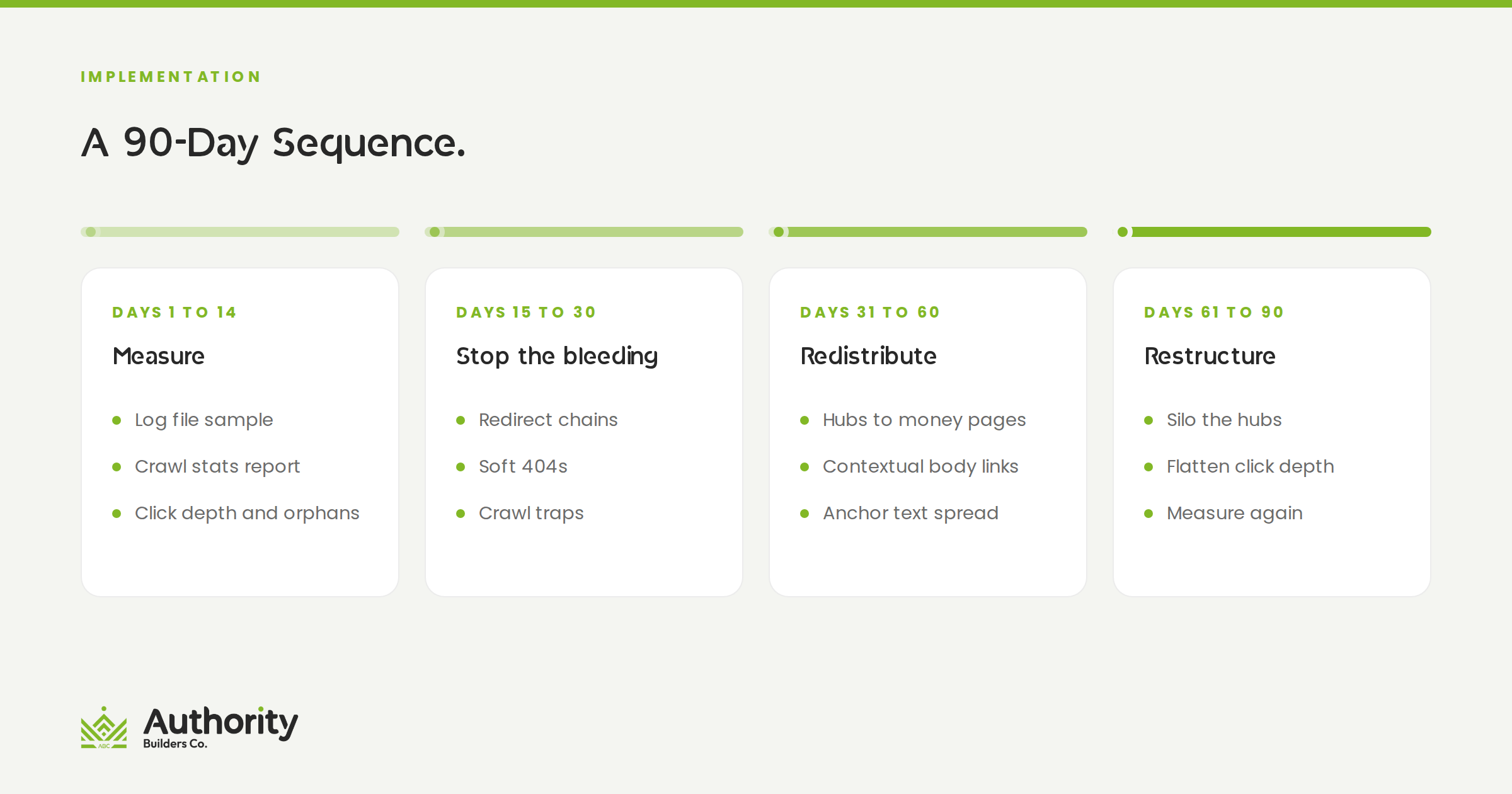
If you’re starting from scratch on a large site, this is the order we’d work in. Front-load the diagnostic, then fix in order of effort-to-impact.
Days 1 to 14, measure. Full crawl with inlinks and depth exported. Search Console crawl stats and Page Indexing reports pulled. Server logs sampled if you’re past 100,000 URLs. Write down the count of URLs in “Discovered, currently not indexed” as your baseline.
Days 15 to 30, stop the bleeding. Handle faceted navigation and parameter URLs. Fix soft 404s. Return proper status codes for removed pages. Collapse redirect chains. This is where the largest crawl waste usually lives and most of it is configuration rather than content work.
Days 31 to 60, redistribute. Work the high-value, low-inlink queue. Add contextual links from your strongest pages to your most important commercial ones. Repoint internal links currently aimed at redirects. Fix generic and empty anchors on links that matter.
Days 61 to 90, restructure and systematize. Rebuild hub pages that aren’t earning their position. Shorten paths to priority pages deliberately rather than globally. Then write the rules down: an internal linking standard for new content, a monthly orphan check, and a quarterly re-crawl. Architecture holds only if maintaining it is somebody’s actual job.
Where We Can Help
Most of this is diagnosis before it’s execution, and diagnosis on a large site is where teams stall. If you’d rather have someone run the crawl, read the logs, and hand you a prioritized queue instead of a report, that’s what our technical SEO services are built for, covering crawl efficiency, site architecture, and the internal link distribution work described above.
If the gap is content rather than configuration, the usual finding is that hub pages are thin and the clusters underneath them have holes. Our SEO blog writing services build out the supporting content that gives an architecture something to connect, with internal linking planned into the brief rather than added afterward.
And when the problem is older pages that rank but no longer earn their internal links, our content refresh service handles the update-and-relink pass on existing posts, which we’ve written about at more length in our guide to content refresh strategy for SEO and AI.
The Short Version
Internal linking at scale isn’t a link-count exercise. It’s two jobs running in parallel: making sure Google can reach and refresh the pages that matter, and making sure the authority you’ve acquired lands on the pages that convert.
Crawl efficiency gets your pages eligible, including for AI Overviews and AI Mode, since those draw from the same index. Authority flow makes them competitive once they’re there. Neither one substitutes for the other, and the sites that win the technical categories are usually just the ones that treated architecture as ongoing infrastructure rather than a one-time project.
If you want a second set of eyes on your site’s architecture before you commit engineering time to it, schedule a call with our team and we’ll walk through what your crawl data is telling you.