
You’ve got blog posts from 2020 sitting on page 2. Traffic is trickling. Rankings dropped. And you’re staring at a blank doc wondering if you should just write something new.
Here’s the thing: that older content isn’t dead. It just needs a refresh.
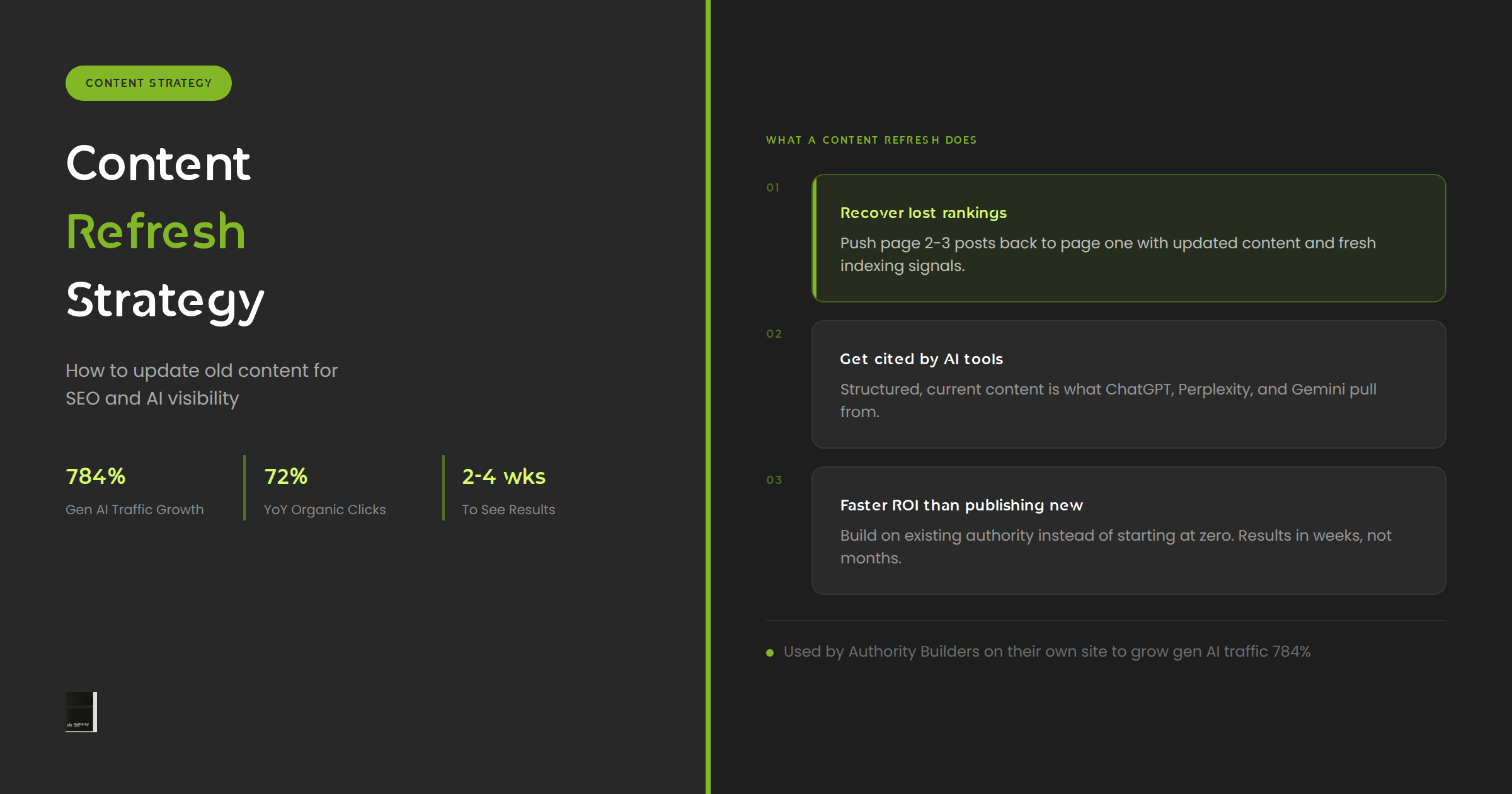
A solid content refresh strategy can recover lost rankings, push underperforming posts onto page one, and, increasingly, get your content cited by AI tools like ChatGPT and Perplexity. We’ve seen it work on our own site, and we’ve watched it work for clients across dozens of industries.
This guide covers what content refreshing actually involves, how to figure out which posts to prioritize, and a step-by-step process you can run right now.
What Is a Content Refresh Strategy?
A content refresh is the process of updating existing posts and pages to improve their accuracy, relevance, and search performance. It’s not a full rewrite from scratch. It’s a targeted upgrade: new data, updated examples, filled-in topic gaps, cleaner structure, and tighter on-page SEO.
There’s a meaningful difference between a content update and a content refresh. An update is small, like fixing a broken stat or swapping out an outdated screenshot. A refresh is a more significant overhaul that justifies updating the publish date and resubmitting for indexing.
When we talk about a content refresh strategy, we mean a systematic approach: knowing which posts to refresh, in what order, with what goals, and how to measure the outcome.
What Gets Changed in a Refresh?
- Outdated statistics and data replaced with current sources
- New keyword targets and semantic coverage gaps filled in
- Thin sections expanded with deeper explanations
- Internal links updated to reflect new content on the site
- Meta title and description rewritten for current search intent
- Structure reorganized if the topic has evolved since publication
- AI-readability improvements: clear answers, well-defined entities, structured formatting
That last one matters a lot right now, and we’ll come back to it.
Why Content Refreshes Matter More Than Ever (SEO + AI)
For years, the conventional wisdom was simple: publish more, rank more. But search has changed. Both Google and AI platforms are rewarding freshness, depth, and authority in ways that make old, stale content a liability.
Google Still Rewards Freshness
Google uses multiple signals to evaluate how current content is, including when the page was last modified, when the URL was first indexed, and the recency of citations and links. For queries with any time-sensitive component, freshness is a meaningful ranking factor.
That’s why refreshing a post, resubmitting it for crawling, and updating the publish date can produce ranking improvements within two to four weeks. It’s one of the fastest SEO wins available, and it costs a fraction of what it takes to produce a new post from scratch.
AI Search Changes the Stakes
This is the part that most content teams haven’t fully accounted for yet.
When someone asks ChatGPT which link building service to use, or asks Perplexity for a beginner’s guide to technical SEO, the answer is being pulled from content those models have learned to trust. That trust is built on the same signals Google uses: depth, accuracy, authority, and freshness.
We tracked our own site through 2025 and into 2026. While running a continuous content refresh program alongside new publishing, we grew generative AI traffic by 784%. ChatGPT alone sent 3,846 sessions. Perplexity was up 541%. Gemini up 683%.
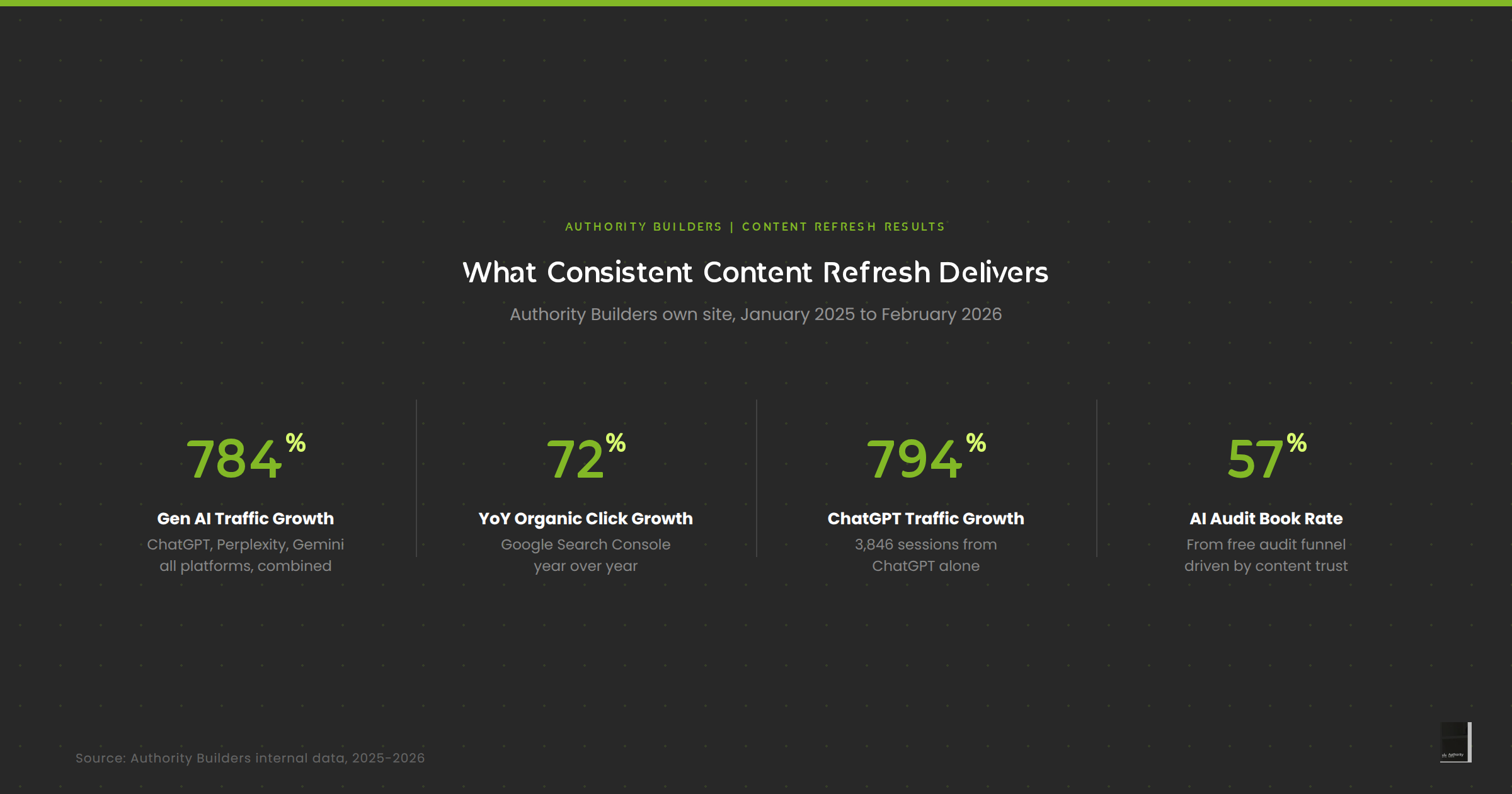
The reason was consistent content investment. We kept posts current, comprehensive, and regularly updated. AI systems learned to reference us. That’s the same dynamic your site can build with a structured refresh cadence.
The ROI Case Is Strong
A new blog post from scratch, optimized well, might take 6-12 months to rank. A refreshed post that already has some authority and backlinks can see results in weeks. You’re building on an asset you already own instead of starting at zero.
One widely cited example: a major agency updated 42 blog posts and saw a 96% increase in traffic, adding more than 8,000 monthly visitors. The math tends to work because you’re not starting cold.
How to Audit Your Content and Pick What to Refresh
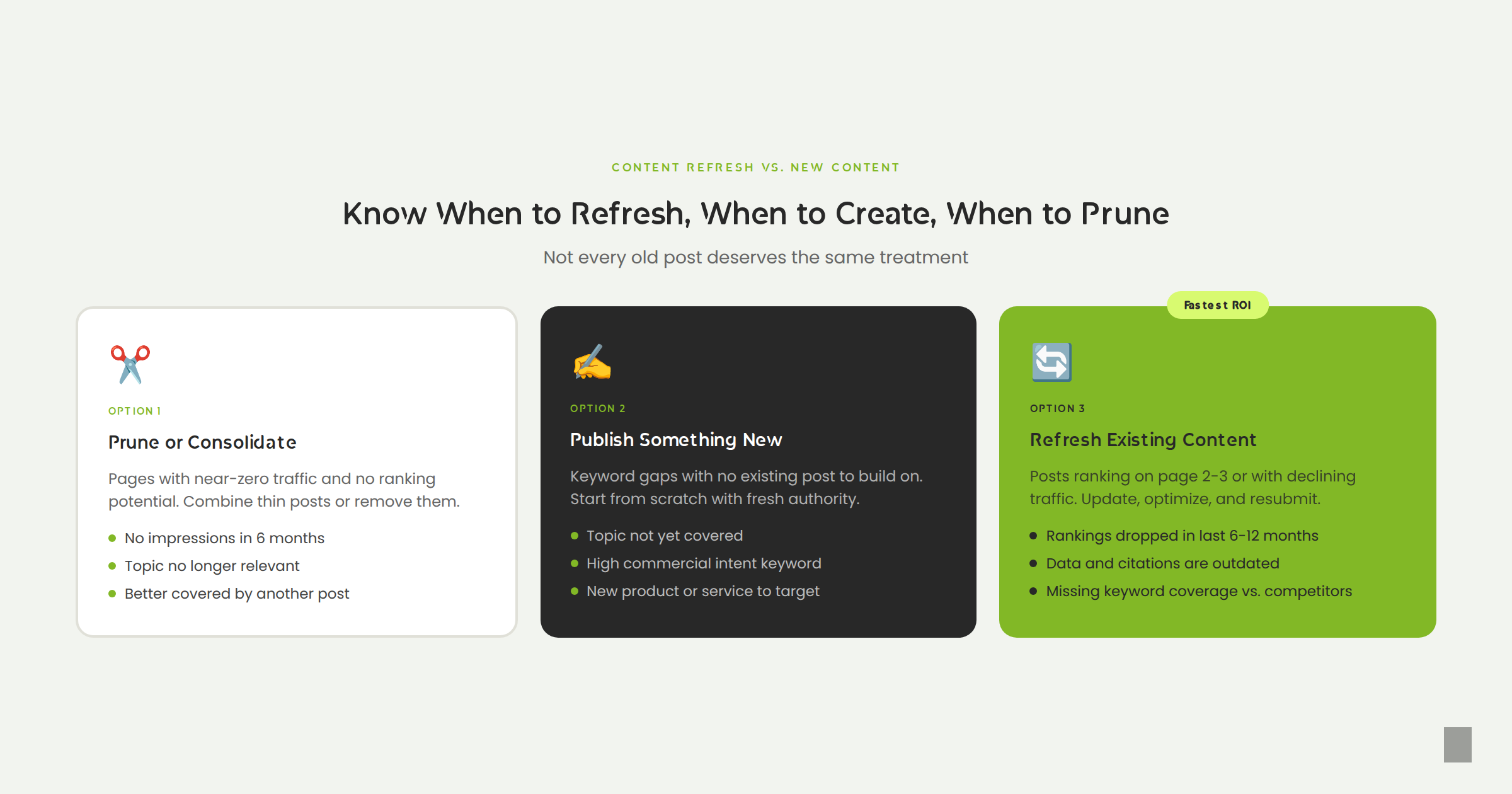
Not everything deserves a refresh. Some posts should be consolidated. Some should be pruned entirely. The goal is to spend your refresh budget where the return is highest.
Here’s how to run a basic content audit before you start.
Step 1: Pull Your Full Content Inventory
Export a list of all blog posts from your CMS or run a crawl with a tool like Screaming Frog. You want: URL, publish date, last modified date, and word count. That’s your starting inventory.
Step 2: Layer in Performance Data
Connect Google Search Console and Google Analytics to your inventory. For each URL, add:
- Impressions and clicks over the last 6 months
- Average ranking position
- Organic sessions and trend (up or down?)
- Bounce rate and time on page
This is where patterns emerge fast.
Step 3: Identify Your Refresh Candidates
Focus on posts that fit one of these profiles:
The Page 2 Graveyard. Posts ranking between positions 11 and 20 for solid keywords. They’re close. A refresh can push them to page one.
The Traffic Drop. Posts that used to rank well but have declined over the last 6 to 12 months. Often fixable with updated content and an internal linking pass.
The Stale Expert Post. Posts that cover important topics but cite data from 3+ years ago or miss major developments. These are damaging your credibility and your rankings.
The Pillar Page. Your most important topic cluster anchors. These need to stay fresh because everything links to them. A weak pillar drags down the whole cluster.
The Commercial Intent Post. Bottom-of-funnel content that targets people ready to buy. These get the most ROI from refreshes because conversions are at stake, not just traffic.
Step 4: Prioritize Ruthlessly
You can’t refresh everything at once. Stack rank your candidates by combining ranking potential (how close to page one?), traffic value (how many people search this?), and business priority (does it drive toward a conversion?). Start at the top of that list.
The Content Refresh Process: Step by Step
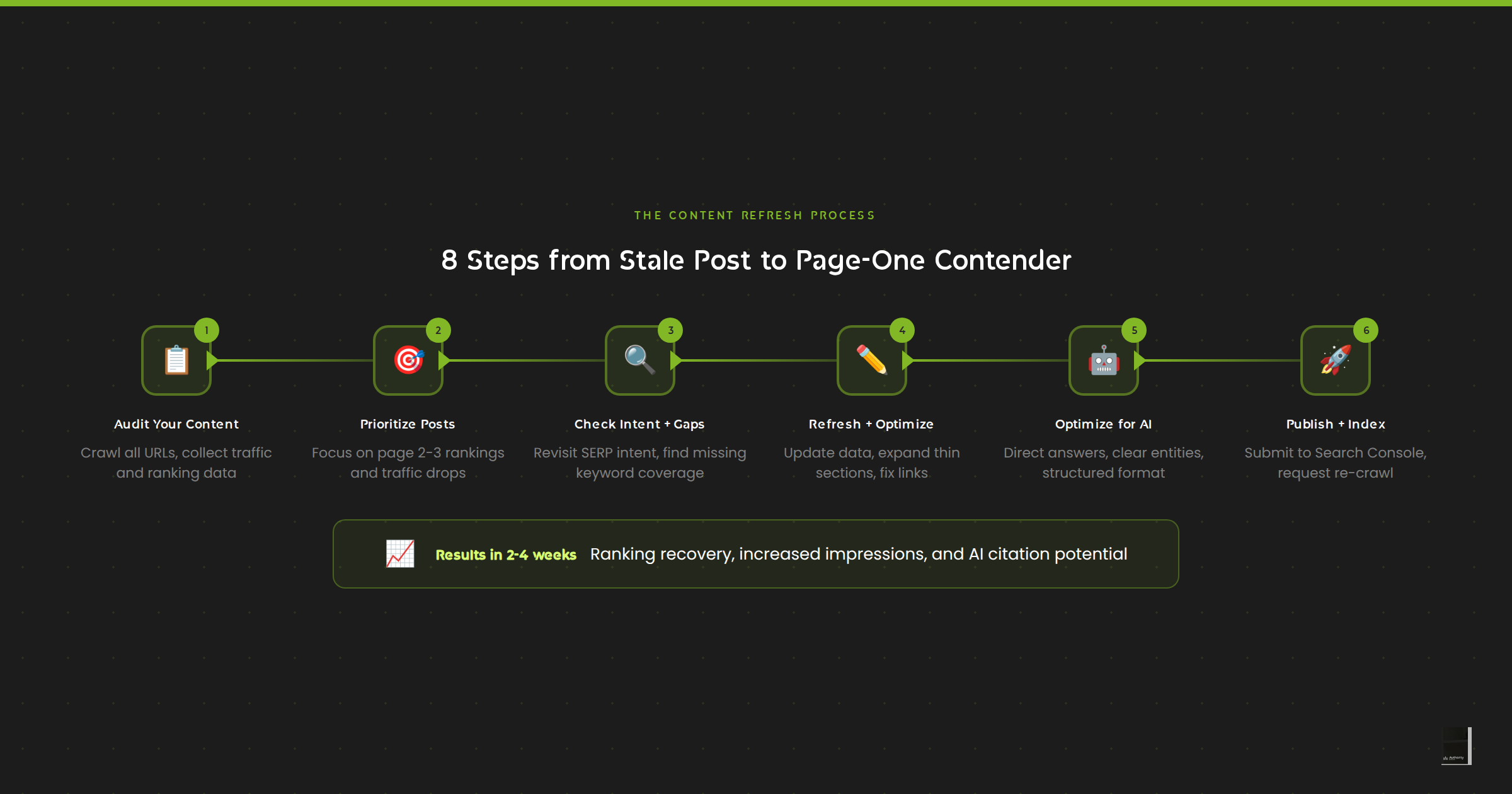
Once you’ve picked a post to refresh, here’s the workflow we use.
1. Revisit Search Intent
Go look at what’s ranking on page one for your target keyword right now. Has the intent shifted? If the top results are now listicles and yours is a long-form explainer, that mismatch is likely hurting you. Align your format to what’s working before you do anything else.
2. Run a Keyword Gap Check
Pull the top three competing posts and identify semantic keywords they cover that you don’t. Ahrefs’ Content Gap tool, or simply reading the top results carefully, will surface these fast. Fill those gaps in your refresh.
3. Update All Data and Citations
Every stat, every study, every external link: check it. Replace anything from 2022 or older unless it’s truly evergreen. If you’re citing a source that’s been superseded, update it. Stale citations signal to search engines and AI systems alike that your content hasn’t been maintained.
4. Expand Thin Sections
Look at your H2 and H3 sections. If any of them are less than two or three substantial paragraphs, ask whether they’re actually answering the question a reader would have. Thin sections are missed opportunities. Expand them with real explanation, not filler.
5. Optimize for AI Readability
This is the step most teams skip, and it’s increasingly important. AI systems pull answers from well-structured, clearly written content. A few specific things help:
- Lead with direct answers. If your H2 asks a question, answer it in the first sentence of that section.
- Define your terms. Don’t assume the reader knows what a link insertion or a canonical tag is. Define it clearly, and AI tools will use your definition.
- Use structured formatting. Numbered steps, comparison tables, and bullet lists get cited more often than dense prose.
- Name the entities. Reference your brand, your tools, and your team members explicitly. Entity clarity helps AI systems attribute content correctly.
6. Update Internal Links
Every content refresh is a chance to strengthen your internal link structure. Add links from the refreshed post to newer related content. And go find other posts on your site that should link to this one and add those too. Internal linking is how you distribute authority and signal topic relevance.
7. Rewrite the Meta Title and Description
If your meta title was written in 2021, it probably doesn’t reflect how people are searching today. Look at what the current top results are using. Match the pattern while making yours more specific or compelling.
8. Submit for Re-indexing
Once the refresh is live, drop the URL into Google Search Console’s URL Inspection Tool and request indexing. Don’t wait for Google to find the changes on its own. Typically, you’ll see ranking movement within two to four weeks.
Content Refresh and Link Building: The Connection
Here’s something that doesn’t come up enough in content refresh conversations: the links pointing at a post matter for how much a refresh can move the needle.
A refreshed post with strong backlinks can see dramatic ranking improvements quickly. A refreshed post with no backlinks might improve, but it’s fighting uphill. The freshness signal helps, but authority still matters.
When we ran our own content refresh program at Authority Builders, we paired it with active link building to our blog content. The combination is what drove the 784% generative AI traffic growth, not content alone. Every backlink and brand mention across high-authority publications is another trust signal for both Google and the language models powering AI search.
If you’ve got posts that are nearly ranking but not quite getting there, the refresh gets them to the threshold. The right links get them over it.
If you want a deeper look at how link building pairs with content strategy, check out our link gap analysis guide. It covers how to identify exactly where your backlink profile is holding your content back.
Or, if you’d rather let us run the content refresh and the link building together, our Content Refresh service handles the full cycle, from audit to execution to promotion.
Start With One Post
You don’t need a 60-post refresh program to see results. You need one well-chosen post, a solid gap analysis, and the discipline to actually ship the updates.
Pick the post sitting closest to page one for a keyword that actually matters to your business. Run the refresh process above. Get it re-indexed. Then see what happens in 30 days.
If you want to build that into a systematic program with link building support behind it, we’d be glad to talk through it. Book a call with us here.