
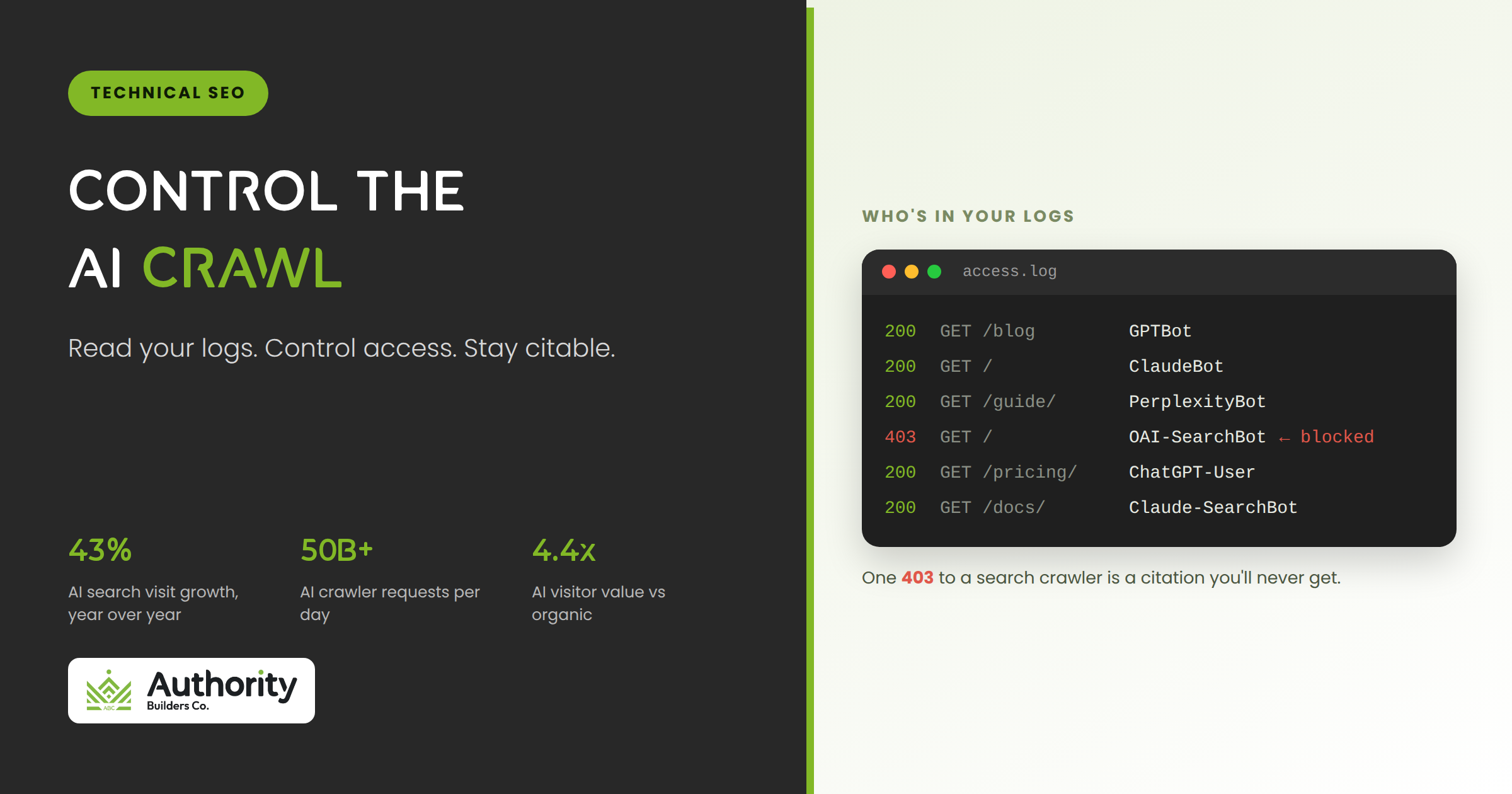
Your access logs used to be a quiet place. Googlebot, Bingbot, a few scrapers, and that was the list. Open them now and you’ll find GPTBot, ClaudeBot, PerplexityBot, and a dozen agents you’ve never written a rule for. Most SEO teams have no policy for any of them, and that gap cuts two ways.
Either you may be accidentally blocking the crawlers that get you cited in AI answers, or you’re quietly letting your content feed model training you never agreed to. Both happen by default, and neither shows up in a rank tracker. This is a technical guide to reading your logs, controlling AI crawler access, and deciding what to do about llms.txt.
The AI crawlers hitting your site
This isn’t a fringe trickle. Cloudflare has reported AI crawlers generating tens of billions of requests per day across its network, and AI search visits grew roughly 43% year over year into 2026. The bots reading your site are now a real acquisition channel, or a real cost, depending on how you handle them.
The commercial case for getting this right is concrete. AI referral visitors tend to arrive with high intent, and by some measures they convert several times better than the average organic visitor. ChatGPT alone drives the large majority of AI referral traffic today. Block the wrong crawler and you don’t lose an abstract AI presence, you lose the highest-intent discovery channel that has grown fastest in the past year, and no ranking report will tell you it happened.
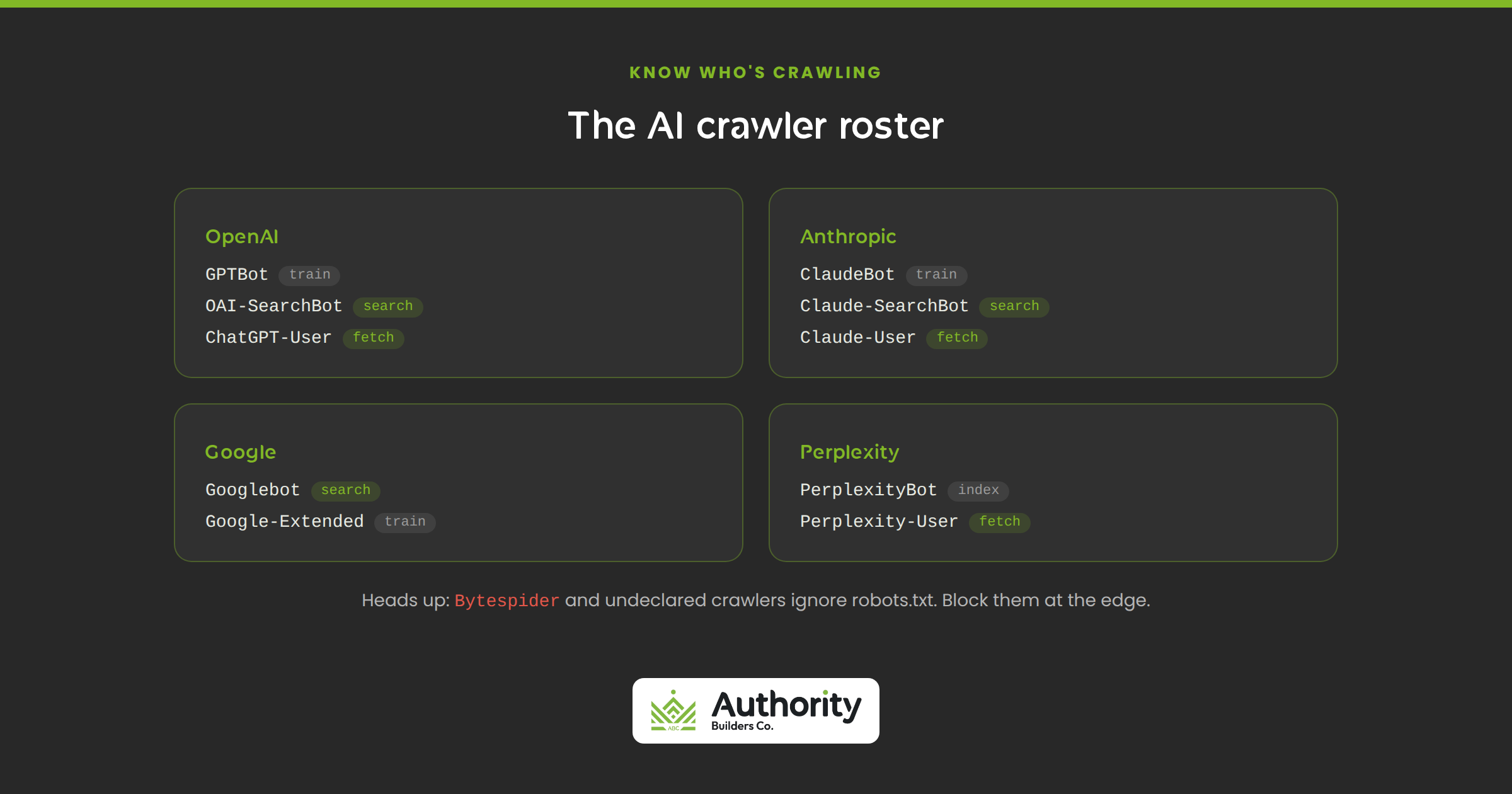
Here’s the current roster worth knowing, grouped by who runs them. OpenAI documents three crawlers: GPTBot, OAI-SearchBot, and ChatGPT-User. Anthropic runs ClaudeBot plus its retrieval agents Claude-SearchBot and Claude-User. Google runs Googlebot for Search and the separate Google-Extended token for AI training. Perplexity runs PerplexityBot and Perplexity-User. Common Crawl’s CCBot feeds many open models, Meta ships Meta-ExternalAgent, and then there are aggressive scrapers like Bytespider that belong in a category of their own.
One quick cleanup note: if your robots.txt still references Claude-Web or anthropic-ai, those strings are deprecated. Rules written against them no longer do anything, so a site blocking only those is not restricting Anthropic’s current crawler.
Training vs retrieval: the distinction that changes everything
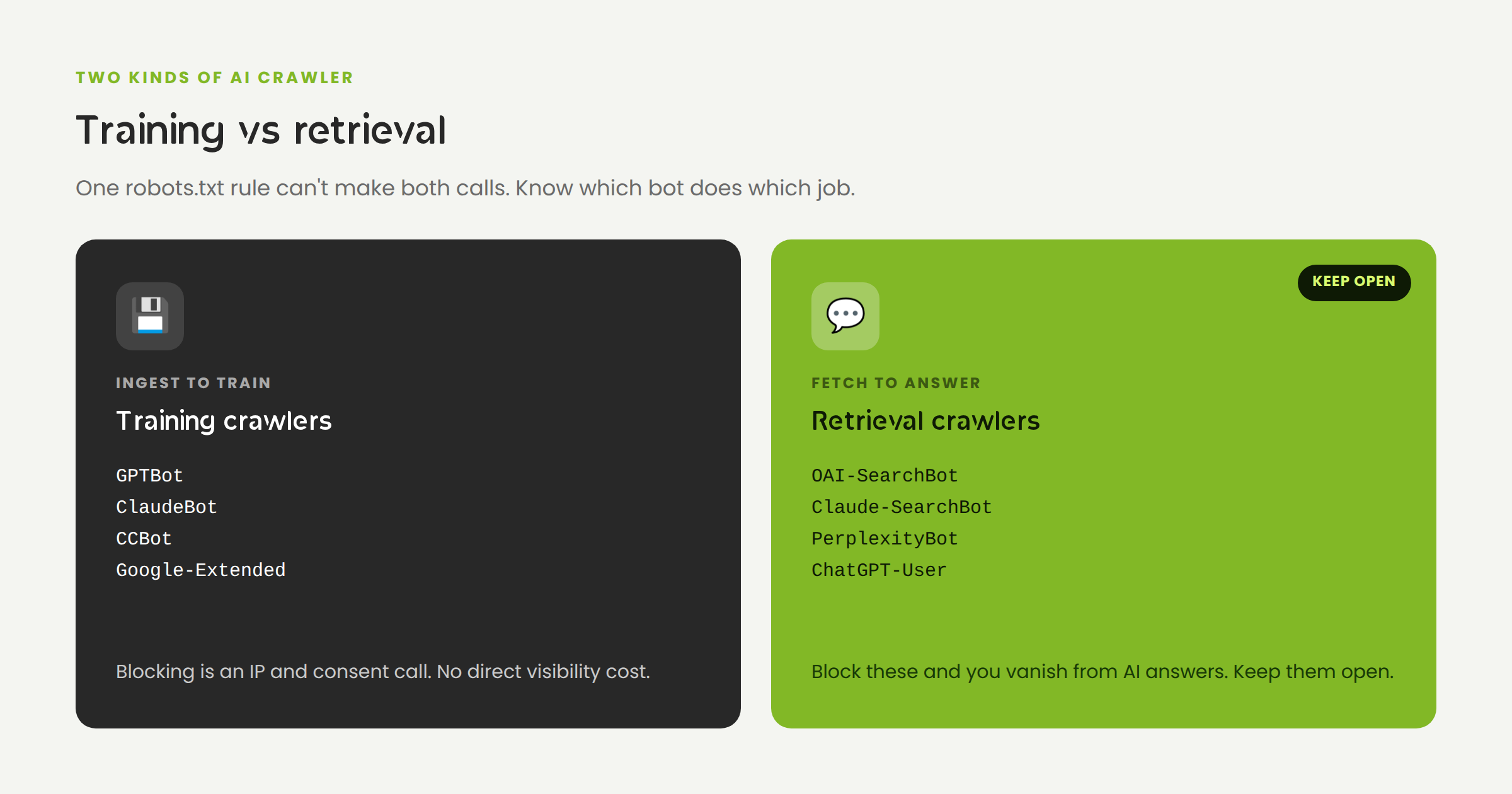
If you take one idea from this post, take this: each provider runs at least two kinds of crawler, and they do opposite things to your business.
- Training crawlers (GPTBot, ClaudeBot, CCBot, and Google-Extended) ingest your content to train future models. Blocking them is an intellectual-property and consent decision. It carries no direct visibility cost.
- Search and retrieval crawlers (OAI-SearchBot, Claude-SearchBot, PerplexityBot, ChatGPT-User) fetch your pages to answer live questions and cite sources. Blocking these removes you from AI answers, a direct visibility cost.
That split is why a single wildcard rule is the wrong tool. It forces one decision when you have two to make. The nuanced move, and the one most enterprises take in 2026, is to allow the retrieval crawlers so you stay eligible for citation, and make a separate, deliberate call on the training crawlers based on how you feel about your content in model datasets.
Google-Extended deserves a special mention, because it’s the one most teams get wrong. It controls whether Google can use your content to train Gemini, and blocking it does not affect your Google Search ranking. Googlebot handles Search, Google-Extended handles training, and they’re independent. If you have IP concerns about generative training but want to keep your rankings, this is the rare clean opt-out.
The costly mistake runs the other way. Accidentally blocking OAI-SearchBot, usually through a blanket rule or a CDN setting, is one of the highest-impact errors in AI visibility. You quietly disappear from ChatGPT’s answers and nothing in your rankings tells you why.
A quick way to reason about your own posture: separate the question of whether you want to be cited from whether you mind being trained on. A local service business almost always wants maximum citation and rarely has content worth protecting from training, so it allows everything. A publisher whose writing is the product may want citations but object to feeding competitors’ models, so it allows retrieval and blocks training. A site with gated research might restrict both on its paid paths and open its marketing pages. The right answer is a policy, not a default you inherited.
Reading your logs for AI bots
Your server log is ground truth. Analytics and Search Console miss most crawler activity, but the raw access log shows exactly which bot hit which URL, how often, and what status code it got back. That’s where an AI crawl audit starts, and it’s why server logs matter for AEO more than they did a few years ago.
Pull the AI user agents out of your access log with a single pass. On an nginx box:
grep -iE “GPTBot|OAI-SearchBot|ChatGPT-User|ClaudeBot|\
Claude-SearchBot|PerplexityBot|CCBot|Bytespider|\
Google-Extended|Meta-ExternalAgent” /var/log/nginx/access.log
Once you can see the traffic, four things are worth reading closely:
- Who’s really visiting. Don’t write rules for bots that never show up. Tune your policy to the crawlers hitting you now.
- Which pages they favor. AI crawlers lean toward recent content. Roughly two-thirds of AI bot hits target pages published in the last year, so stale sections get ignored and rarely cited.
- Response codes. This is the highest-value check. A 403 or 404 served to OAI-SearchBot or PerplexityBot means you’re blocking a citation crawler without knowing it. Grep for status codes on those user agents and fix them first.
- Cost. Training crawlers can consume a large share of bandwidth on a deep crawl. If training bots outnumber retrieval bots several to one, you’re subsidizing someone’s model. Weigh crawler value as citations and referral traffic against bandwidth and compute.
The response-code check deserves its own command. To catch citation crawlers you might be blocking, filter for them and count the status codes they’re getting back:
grep -iE “OAI-SearchBot|PerplexityBot|Claude-SearchBot” \
/var/log/nginx/access.log | awk ‘{print $9}’ | \
sort | uniq -c
If you see 403 or 404 codes next to those agents, you’ve found a leak. Every one of them is an AI answer you were eligible for and didn’t get, and it will never surface in a rankings dashboard.
One caution: a user agent string is trivial to spoof. Before you trust that a hit really came from Googlebot or GPTBot, verify it with a reverse DNS lookup rather than the header alone. And remember what logs can’t tell you: they confirm a crawler fetched a page, not whether you were cited in the answer. For that you need AI visibility tracking on top of the log data.
Controlling access with robots.txt
robots.txt is your primary gatekeeper. It’s a voluntary standard, formalized as RFC 9309, and the major providers honor it on good faith. Changes take effect on the next crawl, and OpenAI notes its systems can take about a day to process an update, so don’t expect instant effects.
List each user agent explicitly instead of leaning on a single wildcard. Individual blocks give you real control over which engine sees which part of the site. Here’s a defensible starting template that stays eligible for AI citations while opting out of training:
# Allow AI search and retrieval (keeps you citable)
User-agent: OAI-SearchBot
User-agent: Claude-SearchBot
User-agent: PerplexityBot
User-agent: ChatGPT-User
Allow: /
# Opt out of AI model training
User-agent: GPTBot
User-agent: ClaudeBot
User-agent: Google-Extended
User-agent: CCBot
Disallow: /
That said, for most public marketing sites the safest default is to allow everything. Blocking protects very little on a public blog and quietly removes you from the fastest-growing discovery channel on the web. Reserve the training opt-out for cases where content consent truly matters, or restrict only gated, paywalled, or sensitive paths rather than the whole site.
If crawler volume is straining your origin, you don’t have to choose between all and nothing. A Crawl-delay directive or path-scoped rules let you keep retrieval bots on your important sections while throttling how hard they hit the rest. Allowing a bot and rate-limiting it are separate levers, and high-traffic sites often need both at once.
When robots.txt isn’t enough
robots.txt is a request, not a lock. Compliant crawlers respect it. Others don’t. Bytespider has been documented ignoring disallow rules at scale, and Perplexity has been caught running undeclared crawlers that rotate user agents and IPs to evade no-crawl directives, while framing its Perplexity-User fetches as an agent rather than a bot that must obey robots.txt.
For the bots that ignore the file, enforcement moves to the server. A Web Application Firewall or a CDN’s bot controls can reject unwanted crawlers at the edge, before they cost you a single CPU cycle. This is also where sound technical SEO earns its keep: access control is an infrastructure decision, not just a text file.
There’s a trap here worth flagging loudly. Your CDN can silently override your robots.txt. Cloudflare’s AI-crawler controls, for example, can block search bots even when your origin file allows them, and that mismatch is one of the top causes of accidental AI invisibility. If your logs show 403s to OAI-SearchBot or PerplexityBot, check your CDN settings before you touch anything else. Confirm the platform isn’t managing a robots.txt that overrides your own.
Whatever rules you set, verify them from the outside. Fetch your own robots.txt and confirm it reads the way you intended. Spot-check a handful of URLs as each user agent and watch the real response codes. And because AI answers are personalized and geo-varied, what a crawler sees from one region isn’t always what it sees from another. Treat verification as a step, not an assumption, because the entire risk here is that the gap between intended and real behavior stays invisible until you go looking for it.
The llms.txt question
You’ve probably been asked whether you need an llms.txt file. Here’s the honest read. llms.txt is a proposed standard: a clean markdown file that gives AI systems a curated map of your most important pages. It’s about navigation, not access. It tells a cooperating agent where your best content is. It does not grant or deny anyone entry.
Two facts keep it in perspective. Adoption is still early, on the order of one in ten domains, and the major AI vendors have mostly not committed to reading it. So don’t mistake llms.txt for an access-control mechanism, because it isn’t one, and don’t expect it to move your retrieval much in 2026.
Our take: it’s low-effort and low-risk, so adding a tidy llms.txt that points to your best pages is fine, and it may help agents fetch what they need efficiently. Just keep it in its lane. The work that moves AI visibility is clean crawlability, strong content, and a correct robots.txt, not a new file that vendors haven’t agreed to honor yet. Add llms.txt if you like, but audit your logs and your robots.txt first, in that order.
Common misconfigurations that quietly cost visibility
Most AI-crawl problems aren’t exotic. They’re the same handful of misconfigurations, and none of them announce themselves. Watch for these:
- The blanket block. A leftover wildcard disallow, or an over-broad AI-block rule that catches retrieval crawlers along with training ones. It’s the fastest way to vanish from AI answers.
- The CDN override. Your robots.txt says allow, but your CDN’s AI-bot toggle says block. The origin file and the edge disagree, and the edge wins.
- Google-Extended confusion. Blocking Googlebot while trying to opt out of training, or assuming Google-Extended affects Search. Keep the two straight: one is Search, one is training.
- Stale user-agent rules. Blocking deprecated strings like anthropic-ai while the live ClaudeBot sails straight through, so your intended rule does nothing.
- No server-side layer. Relying on robots.txt alone against bots that ignore it, so Bytespider and undeclared crawlers keep hitting the origin unchecked.
A practical AI crawl policy
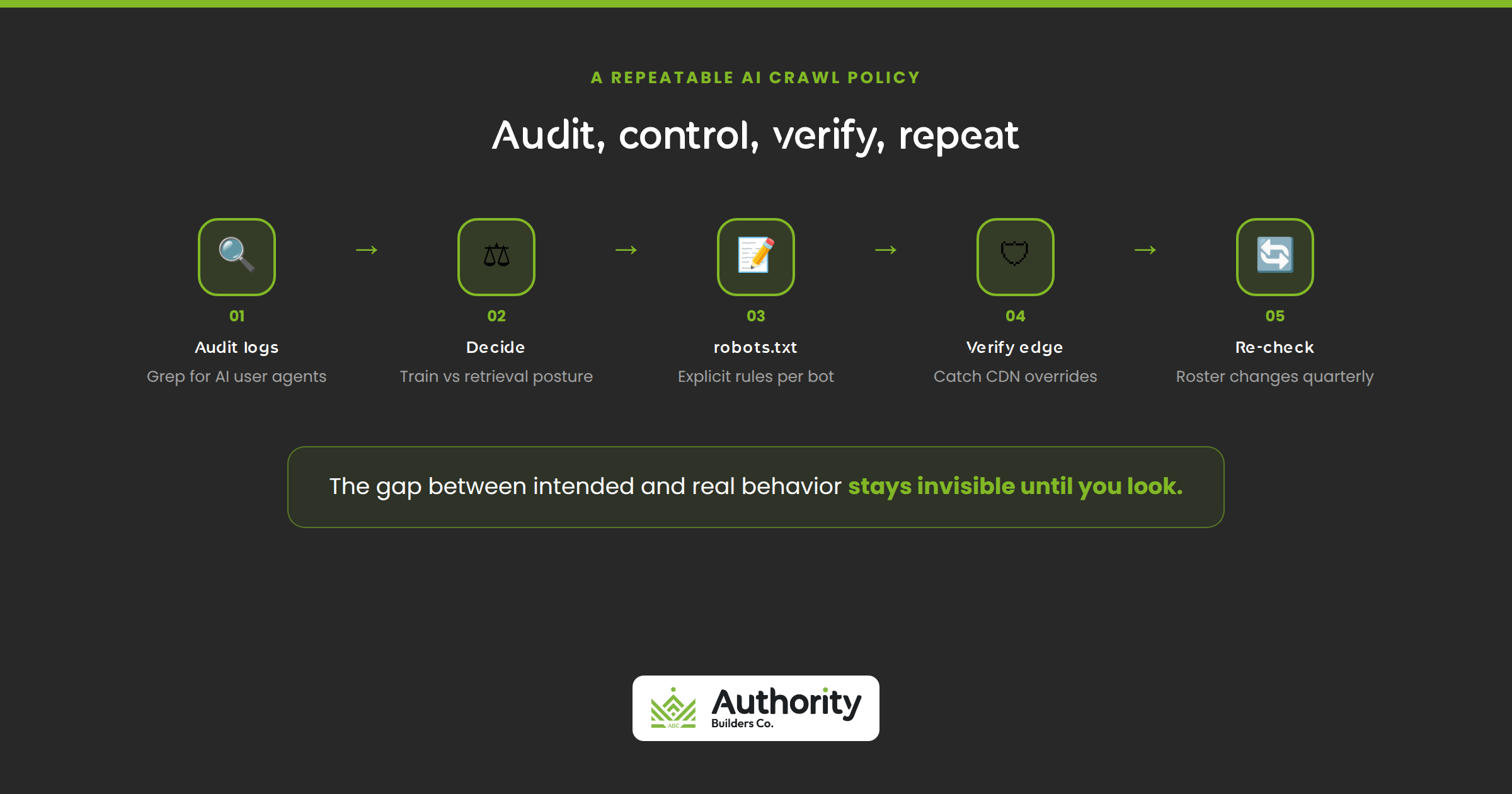
Pull it together into a repeatable routine. This is the sequence we run:
- Audit your logs. Grep for AI user agents, see who’s visiting and how often, and read the response codes. Fix any 403s served to retrieval crawlers before anything else.
- Decide training vs retrieval. Set a posture: allow retrieval bots for citation visibility, and make a deliberate call on training bots based on content consent.
- Write explicit robots.txt rules. One block per user agent or grouped by intent, never a lone wildcard. Deploy to staging, verify, then push to production.
- Verify at the edge. Confirm your CDN isn’t overriding your robots.txt, and add server-side or WAF rules for non-compliant scrapers like Bytespider.
- Re-check every quarter. The roster changes. New crawlers launch, user-agent strings get deprecated, and CDNs ship new defaults. Re-audit the logs and update the rules.
Get your AI crawl setup audited
Most sites we look at are making at least one of these mistakes: blocking a citation crawler by accident, letting a CDN override the robots.txt, or subsidizing training with no visibility upside. That’s exactly the ground our Technical SEO Audit covers, log analysis, crawl control, robots.txt and CDN configuration, and making sure the bots that cite you can reach your best pages while the ones you don’t want get handled at the edge.
Want to know whether AI crawlers can reach and read your site right now? Book a call and we’ll audit it with you.